
This article applies to users with one of the following roles:
- Administrator
- Agency Administrator
- Branch Manager
- Agent
- Supplier
What is the Referral Pipeline?
The Referral Pipeline is the central point of MoveIT where all users are able to view any quotes, referrals and instructions that have been created. Items are organised into separate tabs depending on their status.
Items that are not on the “happy path”, e.g. have been declined or cancelled cannot be viewed in the Referral Pipeline. These items are only viewable by searching for and viewing a single customer.
Suppliers cannot currently view single customer records.
Navigating the Referral Pipeline
Here is a snapshot of the Referral Pipeline.
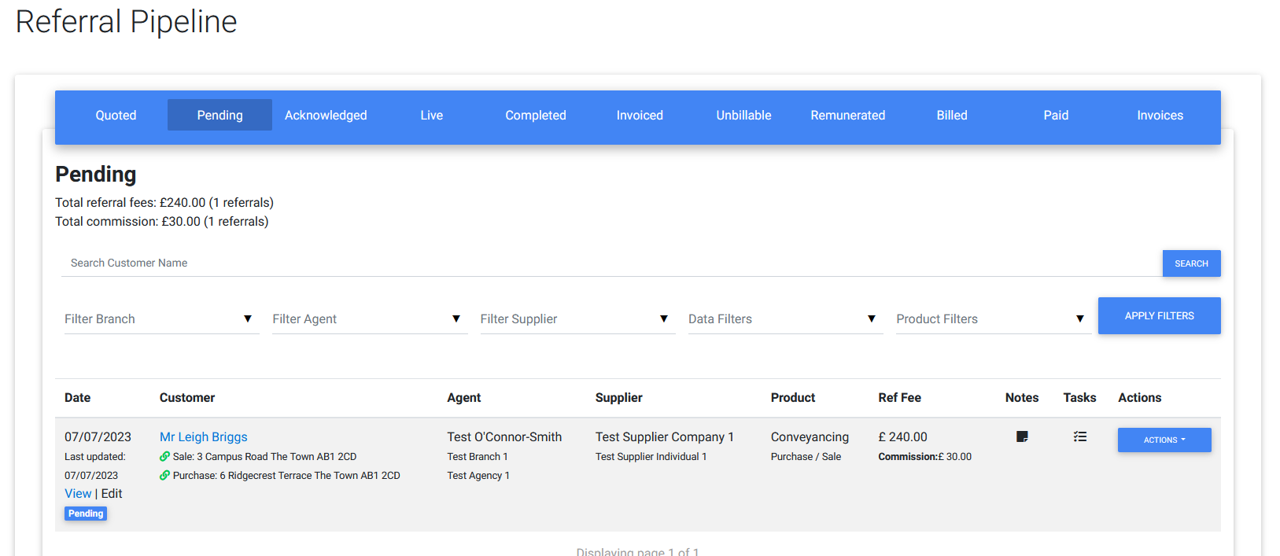
Some pipeline elements may appear slightly differently depending on the current tab and the level of the user viewing them.
The following is a description of each of the tabs:
Quoted
When creating new quotes or preparing new referrals, items will appear in this tab. For example, if you have created Conveyancing or Survey quotes for a customer but have not yet proceeded to create a referral, their quotes will be listed here and you can search by customer.
NB. Even though some products, such as FS, do not generate “quotes”, if you do not proceed to send a referral for a customer, these records will still appear here.
Since these items have not been sent to a supplier yet, this tab is not visible to suppliers.
Available Actions
| Action | Description |
| Reject | This action will simply updated the status of the Quote Set to “Rejected” and remove it from the pipeline. Once a Quote Set is rejected, none of the attached quotes can be sent as referrals by agents or customers. |
Pending
Referrals that have been sent to a supplier but have not yet been accepted or declined by that supplier will appear in this tab. Referrals in this tab may represent multiple instructions, e.g. a sale and purchase for Conveancing or any number of Financial Services.
Available Actions
| Action | Description |
| Resend | Allows an agency user to resend a referral to the relevant supplier. |
| Reject | Allows an agency user to reject a referral if it is no longer required. A supplier will no longer be able to accept or decline the referral. |
| Review Quote | Allows a supplier to view the details of a referral before accepting or declining it. |
Acknowledged
NB. This tab is only applicable to Financel Services referrals, and is therefore only visible to agencies and FS suppliers.
When a Financial Services referral is initially accepted, it moves to the Acknowledged tab. This is to indicate that the supplier has received the record but has potentially not yet made contact with the customer or the customer has not agreed to go ahead with the purchase of any financial services. Once the supplier has agreed with the customer which services they will go ahead with, this information can be captured on the referral and then instructed by the supplier.
Available Actions
| Action | Description |
| Provide Update | Allows an agent or a supplier to provide an update on a referral. |
| Request Update | Allows an agency user to request an update on a referral from the supplier or the agent who created it. |
| Instruct | Allows FS Suppliers to instruct referrals and create instructions in the Live Pipeline. |
| Decline | Allows FS Suppliers to decline previously acknowledged referrals. |
| Reject | Allows agency users to reject / cancel a referral. |
| Follow Up | Allows any user to create a follow up task attached to the referral. |
Live
This tab holds all of the instructions that are currently in progress, that is to say, the relevant supplier has accepted the referral and will provide the relevant service to the customer, but the process has not yet been completed.
Available Actions
| Action | Description |
| Complete | Allows a user to move an instruction to the Completed pipeline when it is ready for billing. |
| Request Update | Allows an agency user to request an update on a referral from the supplier or the agent who created it. |
| Provide Update | Allows an agent or a supplier to provide an update on an instruction. |
| Request Cancel | Allows a supplier user to request the cancellation of an instruction. |
| Cancel | Allows an agency user to cancel an instruction. NB. Supplier users must use Request Cancel. |
| Confirm Live | Allows an agency user to confirm that an instruction a supplier has requested a cancellation for is actually still in progress. |
| Follow Up | Allows any user to create a follow up task attached to the instruction. |
Completed
The referred service has been provided to the customer and the referral fee for the instruction is now ready to be billed. Note that this may be at a different point depending on the product. For example, Conveyancing referral fees are due once a sale or purchase has been completed, Surveys and Property Service instructions are due once the customer has paid for those services and Financial Services referral fees are due once the FS supplier has received their commission from the sale.
Available Actions
| Action | Description |
| Request Cancel | Allows a supplier user to request the cancellation of an instruction. |
| Cancel | Allows an agency user to cancel an instruction. NB. Supplier users must use Request Cancel. |
| Confirm Complete | Allows an agency user to confirm that an instruction a supplier has queried or requested a cancellation for is actually correctly completed. |
| Query Instruction | Allows a supplier user to query why an instruction has been completed if they believe it is still in progress. |
| Reset to Live | Allows an agency user to reset a completed instruction to the Live pipeline. NB. Supplier users must use Query Instruction. |
| Request Update | Allows an agency user to request an update on an instrction from a supplier or the agent assigned to the instruction if it has been queried or cancel requested by the supplier. |
| Follow Up | Allows any user to create a follow up task attached to the instruction. |
Invoiced
This tab contains all the instructions that have been added to an invoice for a supplier to pay for the relevant referral fees, but the fee has not yet been paid to MoveIT.
Available Actions
| Action | Description |
| Request Cancel | Allows a supplier user to request the cancellation of an instruction. |
| Cancel | Allows an agency user to cancel an instruction. NB. Supplier users must use Request Cancel. NB. this action can only be taken before an invoice is paid or a direct debit payment has been requested, after this point, the Credit action will be available. |
| Credit | Creates a credit for the instruction in the Complete pipeline which will be applied to a future invoice. |
| Query Instruction | Allows a supplier user to query why an instruction has been completed if they believe it is still in progress. |
| Reset to Live | Allows an agency user to reset a completed instruction to the Live pipeline. NB. Supplier users must use Query Instruction. NB. If the invoice has been paid or direct debit payment has been requested, this action will create a credit in the Complete pipeline tab as well as a duplicate instruction in Live so that it can be completed and billed again in future. |
| Confirm Complete | Allows an agency user to confirm that an instruction a supplier has queried or requested a cancellation for is actually correctly completed. |
| Request Update | Allows an agency user to request an update on an instrction from a supplier or the agent assigned to the instruction if it has been queried or cancel requested by the supplier. |
| Follow Up | Allows any user to create a follow up task attached to the instruction. |
Unbillable
Any instructions that cannot be billed for one reason or another will appear here.
Available Actions
- None.
Remunerated
Once the referral fees for an instruction have been paid to MoveIT the instruction will appear in this tab.
Available Actions
| Action | Description |
| Request Cancel | Allows a supplier user to request the cancellation of an instruction. |
| Credit | Creates a credit for the instruction in the Complete pipeline which will be applied to a future invoice. |
| Confirm Complete | Allows an agency user to confirm that an instruction a supplier has queried or requested a cancellation for is actually correctly completed. |
| Query Instruction | Allows a supplier user to query why an instruction has been completed if they believe it is still in progress. |
| Reset to Live | Allows an agency user to reset a completed instruction to the Live pipeline. NB. Supplier users must use Query Instruction. NB. this action will create a credit in the Complete pipeline tab as well as a duplicate instruction in Live so that it can be completed and billed again in future. |
| Follow Up | Allows any user to create a follow up task attached to the instruction. |
Billed
After a supplier has paid MoveIT the relevant referral fees, MoveIT will create a self-bill on behalf of each agency that created the referrals that a supplier paid for. i.e. an invoice from the agency to MoveIT for the agency’s share of the referral fee. All instructions currently attached to an agency self-bill that has not yet been paid to the agency will appear here.
NB. this tab is not visible to suppliers.
Available Actions
| Action | Description |
| Request Cancel | Allows a supplier user to request the cancellation of an instruction. |
| Credit | Creates a credit for the instruction in the Complete pipeline which will be applied to a future invoice. |
| Confirm Complete | Allows an agency user to confirm that an instruction a supplier has queried or requested a cancellation for is actually correctly completed. |
| Query Instruction | Allows a supplier user to query why an instruction has been completed if they believe it is still in progress. |
| Reset to Live | Allows an agency user to reset a completed instruction to the Live pipeline. NB. Supplier users must use Query Instruction. NB. this action will create a credit in the Complete pipeline tab as well as a duplicate instruction in Live so that it can be completed and billed again in future. |
| Follow Up | Allows any user to create a follow up task attached to the instruction. |
Paid
The final destination for instructions. Once MoveIT has paid an agency their share of the refferal fees received from a supplier the paid instructions will appear in this tab.
NB. this tab is not visible to suppliers.
Available Actions
| Action | Description |
| Request Cancel | Allows a supplier user to request the cancellation of an instruction. |
| Credit | Creates a credit for the instruction in the Complete pipeline which will be applied to a future invoice. |
| Confirm Complete | Allows an agency user to confirm that an instruction a supplier has queried or requested a cancellation for is actually correctly completed. |
| Query Instruction | Allows a supplier user to query why an instruction has been completed if they believe it is still in progress. |
| Reset to Live | Allows an agency user to reset a completed instruction to the Live pipeline. NB. Supplier users must use Query Instruction. NB. this action will create a credit in the Complete pipeline tab as well as a duplicate instruction in Live so that it can be completed and billed again in future. |
| Follow Up | Allows any user to create a follow up task attached to the instruction. |
Invoices
This tab displays all invoices and self-bills that have been generated for your organisation. This is only visible to Agency Administrators and Suppliers. Each invoice will detail the applicable charges and commission, allow users to download PDF invoices as well as view all of the instructions that were billed as part of that invoice.